Table of Contents
- Easily separate business vs. personal vehicle use with Trackem GPS Private / Work Logging
- Automatically Separate Work and Personal Driving
- Respect Driver Privacy with Optional Location Hiding
- Give Drivers More Control with the Trackem Driver App
- Simplify Fleet Management with Centralized Reporting
- Flexible Settings for Different Businesses
- Better Records, Less Administration
- Make Business and Personal Vehicle Tracking Easier with Trackem GPS
- FAQs
Easily separate business vs. personal vehicle use with Trackem GPS Private / Work Logging
Keeping track of business vs. personal vehicle use and which trips belong to which category can be challenging. Whether you're managing a fleet of company vehicles or employees who use their vehicles for work, having accurate records of business vs. personal vehicle uses is important.
Trackem GPS makes this easier with Private / Work Logging, a feature designed to automatically categorize trips, simplify recordkeeping, and give businesses greater control over how vehicle activity is tracked and reported.
With flexible scheduling, optional location privacy, easy-to-use driver controls, and detailed reporting, businesses can manage work-related travel without the hassle of manually tracking every trip.
Automatically Separate Work and Personal Driving
One of the biggest advantages of Trackem's Private / Work Logging is the ability to automatically classify trips based on predefined work schedules.
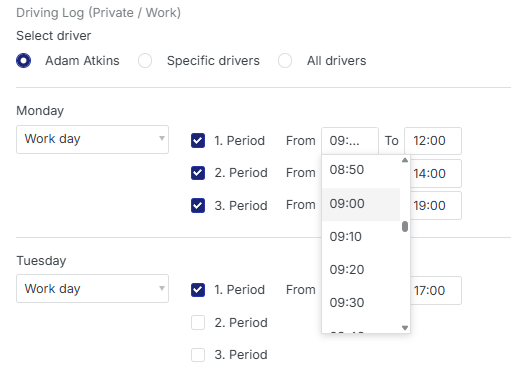
Businesses can establish regular working hours for individual drivers, selected employees, or their entire fleet. Trips taken during scheduled work hours are automatically classified as Work, while trips outside those hours are categorized as Private.
For example, an employee who works Monday through Friday, from 9 AM to 5 PM, can have their trips automatically categorized according to that schedule. Weekend driving and trips outside working hours can be identified as personal travel.

For employees with less predictable schedules, Trackem supports multiple work periods throughout the day, allowing businesses to accommodate split shifts, flexible working hours, and other scheduling arrangements.
The result is less manual recordkeeping, more consistent trip classification, and a clearer picture of business-related vehicle activity.
Respect Driver Privacy with Optional Location Hiding
One of the key considerations when tracking business vs. personal vehicles use is balancing operational visibility with employee privacy.
Trackem GPS offers businesses the option to hide vehicle locations from administrators during Private travel, helping employees maintain a separation between their work and personal driving.
Businesses can choose whether Private trips remain visible to administrators or whether location information is hidden when a vehicle is being used personally.
This flexibility allows organizations to establish tracking policies that suit their operational needs while respecting the personal use of vehicles.
For businesses that allow employees to take company vehicles home or use them outside working hours, this provides an additional level of control over how GPS tracking is used.
Give Drivers More Control with the Trackem Driver App
Not every workday follows a predictable schedule. Employees may work overtime, travel to appointments outside regular hours, or use a company vehicle for personal errands.
The Trackem Driver App provides the flexibility to manage these situations.
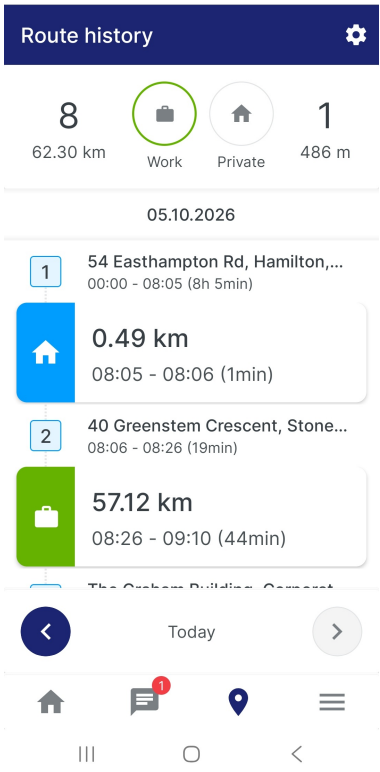
Drivers can switch between Work and Personal driving statuses directly from the app. They can also review their route history and update the classification of individual trips when necessary.
This means that if a trip was incorrectly categorized, it can be adjusted without affecting the rest of the day's driving records.
For additional context, drivers can add explanations to individual trips. Work-related travel can also be associated with a specific client or customer and an invoice number, providing useful information for businesses that need to connect vehicle activity with customer visits or billable work.
The Driver App displays Work and Personal travel in different colours, making it easy for drivers to distinguish between the two when reviewing their routes.
Simplify Fleet Management with Centralized Reporting
For fleet managers and business owners, separating personal and work-related travel is only part of the equation. Having access to organized, useful information is just as important.
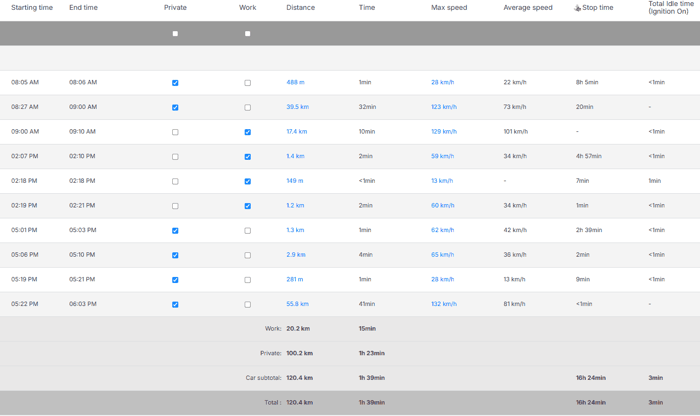
Trackem GPS provides administrators with a Routes report that identifies the status of recorded trips and summarizes important driving information, including:
- Distance travelled
- Driving time
- Vehicle speed
- Stop time
- Idle time
By automatically distinguishing business vs. personal vehicle use, administrators can more easily review business-related vehicle activity and understand how vehicles are being used, subject to the organization's selected privacy settings.
Changes made by drivers through the Driver App are reflected in the reporting system in real time, helping keep records consistent and up to date.
These records can also be valuable for accounting, business mileage tracking, expense allocation, and tax-related recordkeeping, helping businesses organize vehicle usage information without relying entirely on manual mileage logs.
Flexible Settings for Different Businesses
Every business operates differently, and a one-size-fits-all approach to tracking vehicle use doesn't always work.
Trackem's Private / Work Logging supports a range of scheduling arrangements, from traditional office hours to more complex workdays.
Administrators can establish work schedules for individual drivers, specific groups of drivers, or all drivers. Each day can include up to three separate work periods, and entire days can be designated as Private.
Drivers can also manage automatic route classification settings through the Driver App.
Whether your business operates a traditional Monday-to-Friday schedule or employs drivers with varying hours, Private / Work Logging can adapt to the way your team works.
Better Records, Less Administration
Manually maintaining business mileage logs can be time-consuming, especially when employees frequently switch between work and personal vehicle use.
By combining GPS route history with automatic classification, optional privacy controls, and driver-managed adjustments, Trackem GPS helps reduce the administrative effort involved in maintaining accurate travel records of business vs. personal vehicle use.
For businesses, this means:
- Less manual tracking: Automatically categorize trips according to work schedules.
- Greater flexibility: Allow drivers to adjust trip classifications when schedules change.
- Optional location privacy: Choose whether administrators can view vehicle locations during Private travel.
- Improved recordkeeping: Maintain organized Work and Personal driving records.
- Better visibility: Review business-related distance, driving time, stops, and idle activity.
- Simplified mileage reporting: Support accounting, expense tracking, and tax-related recordkeeping.
- Additional trip details: Associate work travel with customers and invoice numbers when needed.
Make Business and Personal Vehicle Tracking Easier with Trackem GPS
Managing fleets that serve both business vs. personal vehicle use doesn't have to mean complicated mileage logs, unnecessary administrative work, or compromising personal privacy.
With Trackem GPS Private / Work Logging, businesses can automate trip classification, give drivers the flexibility to manage their travel records, establish appropriate privacy settings, and access organized reporting through one GPS tracking platform.
Spend less time sorting through vehicle activity and more time focusing on your business.
Interested in learning how Trackem GPS can help your business manage Work and Private vehicle travel?
Contact Trackem GPS today to learn more about Private / Work Logging and our fleet tracking solutions.
FAQs
How does Trackem GPS separate business vs. personal vehicle use?
Trackem GPS uses automated scheduling to categorize trips based on predefined working hours. Drives during work hours are tagged as Work, while off-hour drives are categorized as Private. Drivers can also adjust classifications manually using the Trackem Driver App.
Can employees hide their vehicle location during personal driving?
Yes. Trackem GPS includes optional location hiding for Private trips. Organizations can choose whether administrators can view real-time locations during personal travel, ensuring employee privacy outside work hours while maintaining administrative oversight during working hours.
What happens if a trip schedule changes or a driver works overtime?
Drivers can use the Trackem Driver App to switch between Work and Personal status on the fly. They can also review past routes, reclassify individual trips, add notes, and link work travel to specific customers or invoice numbers.
How does Private / Work Logging simplify fleet reporting and tax compliance?
Trackem GPS generates centralized Routes reports summarizing business mileage, driving time, stop time, and idle time. Automatically distinguishing between work and personal travel eliminates manual mileage logs, making tax preparation, accounting, and expense allocation much easier.
Does Trackem GPS support flexible work hours and split shifts?
Yes. Trackem supports up to three separate work periods per day for individual drivers or groups. This allows businesses with non-standard hours, split shifts, or flexible schedules to seamlessly automate trip classification.